Symbol Analysis
Understand which functions and variables consume memory. To open this view, click "Show Symbol Analysis" from the Build Comparison page.
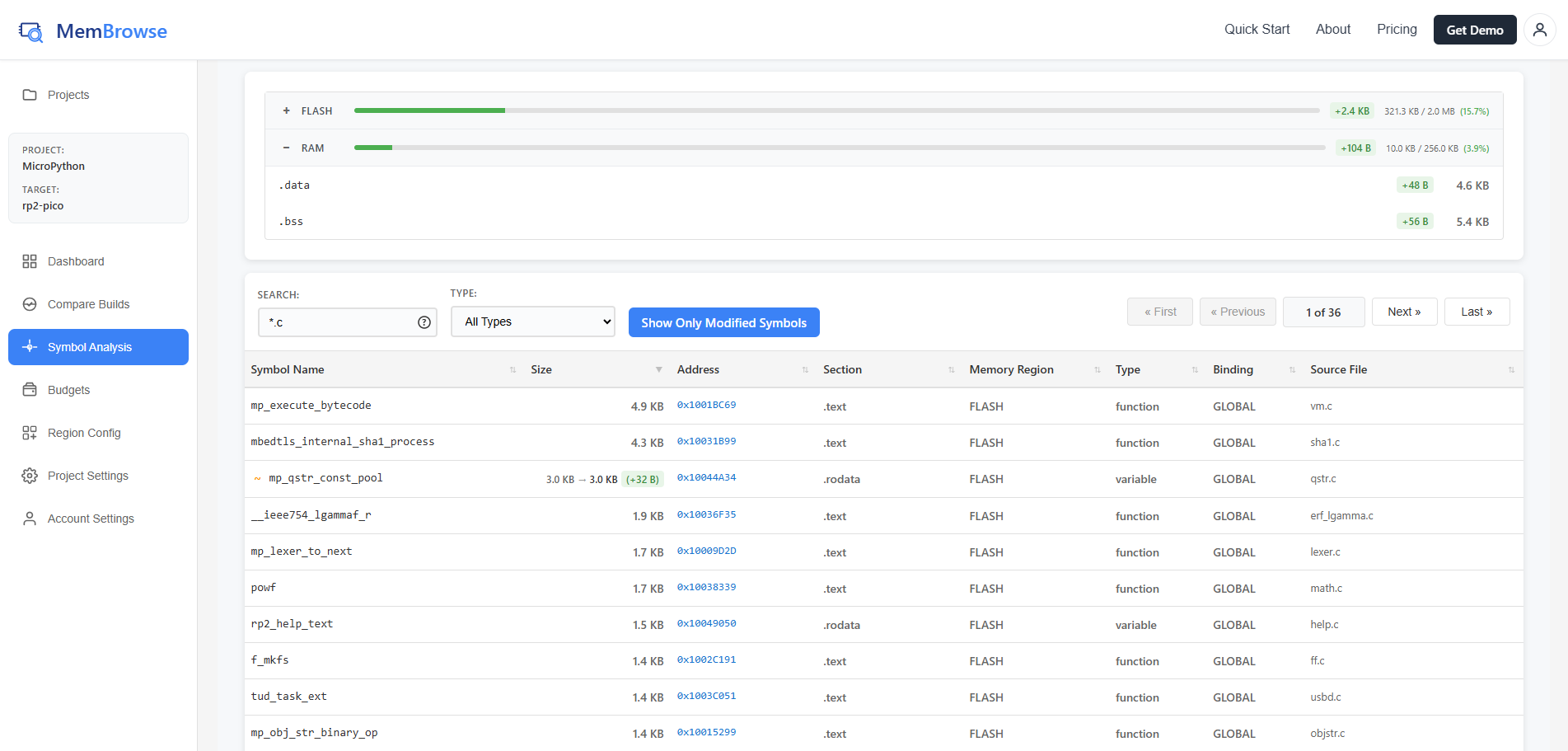
The symbol analysis view breaks down your firmware into individual functions and variables, showing exactly where memory is being used. This view helps you:
- Find the biggest consumers: Sort by size to see which functions use the most memory
- Track changes: See which symbols grew or shrank between commits
- Identify optimization targets: Focus your efforts on the largest symbols for maximum impact
- Understand dependencies: See which source files contribute the most to memory usage
Build Selector
At the top of the page, select a base and head build to compare. Use the swap button to switch them. The commit details bar below shows the SHA and message for each selected build.
Click "Show Build Comparison" to switch to the Build Comparison view for the same two builds.
Memory Layout
The interactive memory layout widget at the top shows a visual map of memory regions and sections. Click on a region or section to filter the symbols table below to only show symbols in that area.
Symbols Table
The table lists all symbols with the following sortable columns:
| Column | Description |
|---|---|
| Name | Function or variable name (with +/~/- prefix for changes) |
| Size | Bytes consumed (shows old to new with delta for modified symbols) |
| Address | Memory address in hex |
| Section | Which section it belongs to (.text, .data, etc.) |
| Memory Region | Which region contains the symbol |
| Type | Symbol type (FUNC, OBJECT, etc.) |
| Binding | Symbol binding (LOCAL, GLOBAL) |
| Source File | Source file path (if debug symbols available) |
Filtering
- Search by name: Supports wildcard patterns using
*and? - Filter by type: Dropdown to show only FUNC, OBJECT, or other symbol types
- Show Only Modified Symbols: Toggle to hide unchanged symbols when comparing two builds
Symbol Changes
When comparing two builds, symbols are highlighted:
- Added symbols (green): New functions or variables
- Removed symbols (red): Deleted code
- Changed symbols (yellow): Size or binding differences